
MyAdaMath Teacher Help
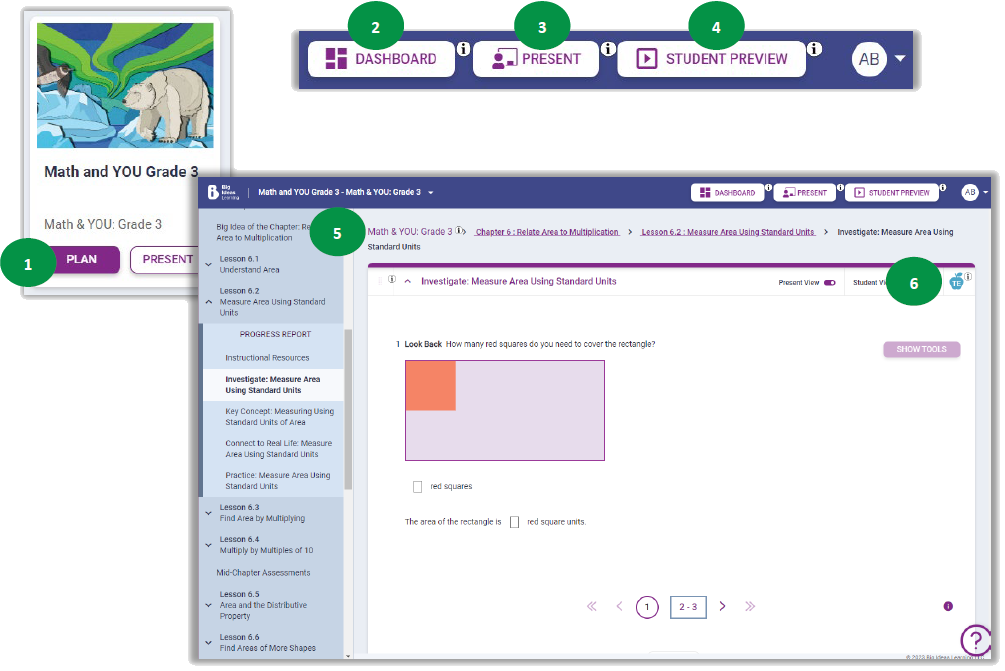
- Select Plan for one of the classes on your Courses tab.
- Choose Dashboard to see an overview of student assignment and assessment data.
- Select Present to launch the current content into teaching mode.
- Choose Student Preview to see content exactly how your students will see it.
- Look at the hierarchy, or "breadcrumbs," to identify where you are in the sequence of content. Click any of the links to go to that part of the Learning Path.
- Select the TE icon to review teaching notes for that specific content, including scaffolding notes, questions for discussion, Mathematical Actions and Processes notes, and tips for supporting learners.