
MindTap For K-12 Instructor Help
Before adding links to MindTap for K–12 activities, make sure your MindTap for K–12 course is set up the way you want it.
- Add and organize the assigned activities and course materials for your MindTap for K–12 course.
Links created in this way are sometimes called deep links because they are not just web links but allow data to be exchanged between Sakai and MindTap for K–12.
Open your Sakai course.
Click Add Content › Add Learning App.
Click the Cengage tool.
If the tool is not available, contact your administrator.
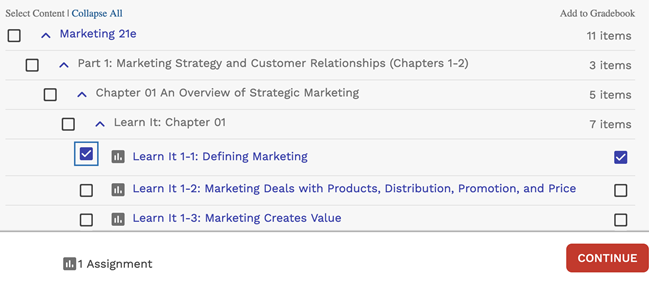
Click Select Content and select activities to include in your class.
Graded activities that have already been added are marked
 . To avoid duplicate activity links and gradebook columns, do not import the same activity twice.
If needed, change gradebook syncing for specific activities.
By default, when you include a graded activity it is added to the Sakai gradebook.
To remove an activity from the gradebook, clear Add to Gradebook.
To sync an activity to the gradebook without creating an activity link, first select Add to Gradebook and then clear the Add to Course checkbox on the left.
Click Continue.
Your link is added to the Sakai Lessons area.
If needed, you can reorganize the links in Sakai.