
WebAssign Instructor Help
- Sign In / Account
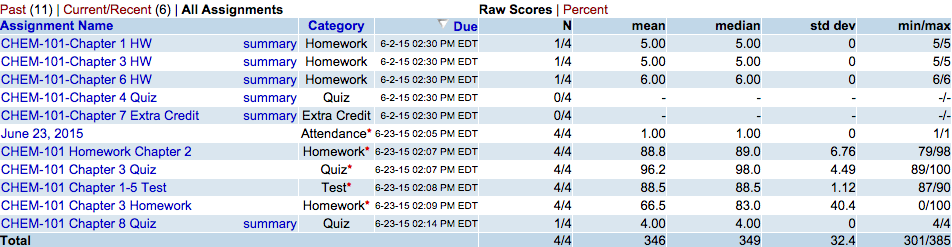
Heading | Description |
|---|---|
Assignment Name | The name of the assignment, with links to view the student's answers and an activity log. |
Summary | Links to the specific assignment with the correct answers and number of attempts on each question. |
Category | The assignment type. |
Due | The assignment due date. |
N | The number of students scores per submission. |
mean | The arithmetic mean for all student submissions. |
median | The median score for all student submissions. |
standard deviation | The standard deviation of scores for submitted questions. Lower standard deviations mean the values are tightly clustered; higher standard deviations mean the values are more widely scattered. |
min/max | The lowest and highest scores or times to complete submitted questions. |
- A red asterisk (*) beside a score indicates the score has been changed by the instructor.
Actions
You can perform a number of activities from the Class Analysis page.
To do this | Do this | More information |
|---|---|---|
View the distribution of student answers for each question on each assignment | Click summary | |
View assignment analysis | Click the assignment name | |
View data as percentages | Click Percent | |
View data using the raw scores | Click Raw |