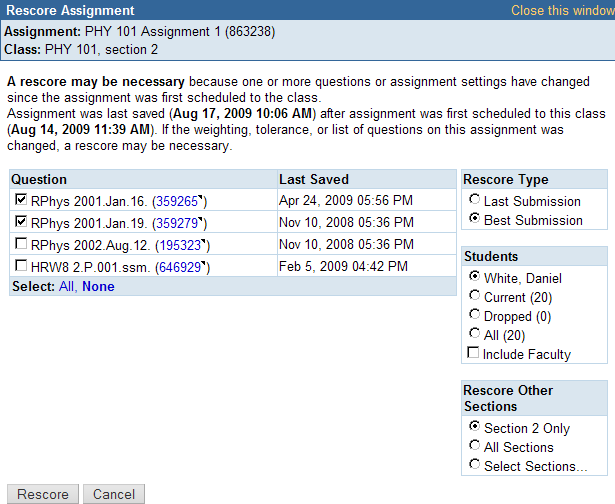
If a problem with assignment scoring affects only one or a few students, do not rescore
the assignment
for the entire class. Instead, rescore the assignment just for the affected students.
For
LMS-integrated courses, a rescore also syncs scores to your LMS. Rescoring is faster
than a manual sync
because it syncs only the rescored assignments.
Open the My Classes
page.
Click Classes > My Classes and find the section you want.
In your ClassView page, click
scores for the assignment you need to rescore.
In the Scores page, click the name of the student whose
assignment you need to rescore.
In the Responses page, click
Rescore.
Under Question, select the check boxes for the questions you need to
rescore.
Under Rescore Type, select the scoring method you want to use:
Last Submission rescores using the final
submission for each question
Best Submission rescores using the best
submission for each question part
Note Not all Rescore options are always displayed. If you have
Scoring Answers setting for the assignment set to
Last Submission, you can rescore using
Last Submission or Best
Submission. All other types of scoring only allow you to
rescore using the assignment's current Scoring
Answers setting.
Under Students, make sure that the student is selected. This ensures that you
are rescoring only the selected student's assignment.
Under Rescore Other Sections, ensure that the current section is selected. This
ensures that you are rescoring only the current class section.
Click Rescore. The rescoring progress is
displayed.