
5.024 (April 28, 2026)
Accessibility Improvements
We’re continuing to enhance accessibility across Visible Body Courseware as part of our ongoing remediation efforts. This release includes updates that improve screen‑reader support, keyboard navigation, and overall usability for learners using assistive technologies. Accessibility refinement is an ongoing part of our development process.
And as always, we've fixed bugs and made other improvements.
5.023 (April 14, 2026)
Visible Body Updates
Courseware Updates: Bug fixes and minor improvements.
5.021 (March 23, 2026)
Accessibility Improvements
We’re continuing to enhance accessibility across Visible Body Courseware as part of our ongoing remediation efforts. This release includes updates that improve screen‑reader support, keyboard navigation, and overall usability for learners using assistive technologies. Accessibility refinement is an ongoing part of our development process.
And as always, we've fixed bugs and made other improvements.
5.020 (March 16, 2026)
You can now add custom views to your assignments in Visible Body Courseware with the assignment builder!
- Press the Create New Assignment button and you’ll find a new section with your saved Favorites and Tours
- Preview them, add them to your assignment, add your own instructions, and even points
- When students access these custom views in their assignments, time on task and points for completion will report to the Gradebook
Brand new Diffusion simulation is now available to assign!
- Experiment and observe how different substances cross the plasma membrane
- Add or remove ions and molecules to see how concentration gradients drive the direction of movement
5.019 (March 9, 2026)
Accessibility Improvements
We’re continuing to enhance accessibility across Visible Body Courseware as part of our ongoing remediation efforts. This release includes updates that improve screen‑reader support, keyboard navigation, and overall usability for learners using assistive technologies. Accessibility refinement is an ongoing part of our development process.
And as always, we've fixed bugs and made other improvements.
5.014 (February 5, 2026)
Accessibility Improvements
We’re continuing to enhance accessibility across Visible Body Courseware as part of our ongoing remediation efforts. This release includes updates that improve screen‑reader support, keyboard navigation, and overall usability for learners using assistive technologies. Accessibility refinement is an ongoing part of our development process.
And as always, we've fixed bugs and made other improvements.
5.013 (January 26, 2026)
Visible Body Updates
- Courseware Updates: Bug fixes and minor improvements.
5.012 (January 20, 2026)
Visible Body Updates
- Courseware Updates: Bug fixes and improvements.
5.012 (December 18, 2025)
Visible Body Updates
- Courseware Updates: Bug fixes and improvements.
5.010 (December 9, 2025)
New Content and More!
New Lymphatic System content is now available in the assignment builder!
3 new animations
- Cell-Mediated Immunity
- HIV/AIDS
- Humoral Immunity
- Lymph Node model
- Thymic Involution illustration
- Hypersensitivity reactions slideshow
- Updates to Bony Landmark and Muscle Detail views
- Higher quality images added for multiple choice questions
Zero-point assignments in the Courseware gradebook!
If you toggle the “show in gradebook” setting on when creating or editing a zero-point new assignment, a gradebook column will appear showing “-/0” before a student starts, and updating to “0/0” with time-on-task and other details once they begin.
Finally, for our LTI 1.3 integration users, the “graded” toggle has been updated to appear on the assignment level, instead of for each activity.
You can still change the points for each activity.
And as always, we’ve fixed bugs and made other improvements, including accessibility updates.
Important Notice: The "What’s New" page in the Courseware Resource Center will be retired in mid-December. Release notes will still be updated regularly and remain available, with a link to the article version provided in the same location.
5.009 (December 2, 2025)
Visible Body Updates
- Courseware Updates: Bug fixes and improvements.
Important Notice: The "What’s New" page in the Courseware Resource Center will be retired in mid-December. Release notes will still be updated regularly and remain available, with a link to the article version provided in the same location.
VBS Product 6.4.17 (November 19, 2025)
New in VB Suite: Lymphatics and Immunity!
- Explore a microanatomy model of a lymph node to understand how it supports fluid regulation and the body’s immune system.
- Watch 3 new animations on HIV/AIDS, cell-mediated immunity, and humoral immunity.
- Study new illustrations that highlight thymic involution and different types of hypersensitivities.
- Bug fixes and improvements.
5.007 (November 6, 2025)
Visible Body Updates
- Courseware Updates: Bug fixes and improvements
5.006 (October 30, 2025)
Visible Body Updates
Courseware Updates: Bug fixes and improvements.
5.004 (October 20, 2025)
Resource Center Update
We've redesigned the Instructor Getting Started page in our Resource Center. Click the link on the left-hand navigation to check it out!
Enjoy a new simplified Getting Started folder, a course with the latest A&P published assignments, and a quick link to the My Apps page.
And as always, we’ve fixed bugs and made other improvements.
5.003 (October 14, 2025)
Updates to our LTI 1.3 Integration
You can now add Visible Body’s Course Home to your LMS course right from our deep linked assignment library! Course Home makes it easier to manage course content, as well as giving students and instructors one-click access to the full Visible Body Suite app. Our LTI 1.3 integration is available for everyone, whether site license and individual student purchase customers.
And as always, we’ve fixed bugs and made other improvements.
5.002 (October 1, 2025)
Updates to New Assignments
Our new assignments are easier than ever to use!
- Students can now select images during our new assignment quizzes to see a larger version of the image.
- Systems Tray now offers by-layer functionality for all systems.
- Bony landmarks now overlay a pattern on selected landmarks and dull down the colors for the other landmarks.
- The 3-dot menu options in the gradebook are now clearer.
We’ve also added new content into the assignment builder:
- Simplified circulatory system view
- Simplified nervous system view
- Bony landmarks, brain landmarks, and many more landmark views
And as always, bug fixes and improvements.
5.00 (September 9, 2025)
LMS Integration and Assignments Updates
This release brings fresh tools and seamless workflows for both instructors and students:
- Students can now purchase access directly through our LTI 1.3 integration! Whether your institution uses a site license or individual purchases, learners can connect seamlessly in Canvas, Blackboard, D2L, Schoology, or Moodle.
- The Assignments page has gotten a makeover! You can now search your assignments with live search and filter by due date, publish status, or recent activity. We also refreshed the design to make everything feel more streamlined, especially as you jump into editing and organizing. Bulk editing now kicks in when you select an assignment, and checkboxes now appear when you hover. With our new search, filtering, and bulk editing updates, managing assignments is easier than ever!
And as always, we’ve done the usual bug fixes and improvements.
4.108 (August 28, 2025)
Visible Body Updates
Courseware Updates: Bug fixes and improvements.
VBS Product 6.2.22 (August 27, 2025)
What's New in VB Suite
Your feedback and suggestions have inspired these new updates in VB Suite:
- Compact mode: The info box can now be fully collapsed, providing a less intrusive experience when in a 3D view.
- Body system layers: Add or remove layers to all human body systems in the Systems Tray by using the new plus or minus icons.
- Flashcard functionality: Have you drawn on a Flashcard? You can now copy drawings from one side of the card to the other.
- Bony landmark views: You can now find bony landmark views in the main menu.
- Bug fixes and improvements.
4.107 (August 5, 2025)
Updates to New Assignments
- When in your assignment, you can now easily navigate back to the main activity view from isolate mode, landmarks, and other explore views.
- We've improved initial loading times, as well as reduced errors for assignments with lots of quiz activities.
- And, as always, bug fixes.
4.106 (July 28, 2025)
Visible Body Updates
Courseware Updates: Improved load times, bug fixes, and enhancements.
VBS Product 6.1.25 (July 21, 2025)
Here's What's New in VB Suite:
- Content Search is now part of the main menu, making it faster and easier to find and launch the assets you need.
- For your convenience, we’ve added a new section to the Content Search and Home tabs where you can find a collection of your recently visited content.
- Minor bug fixes and improvements.
4.105 (July 17, 2025)
New Assignment Content and Features
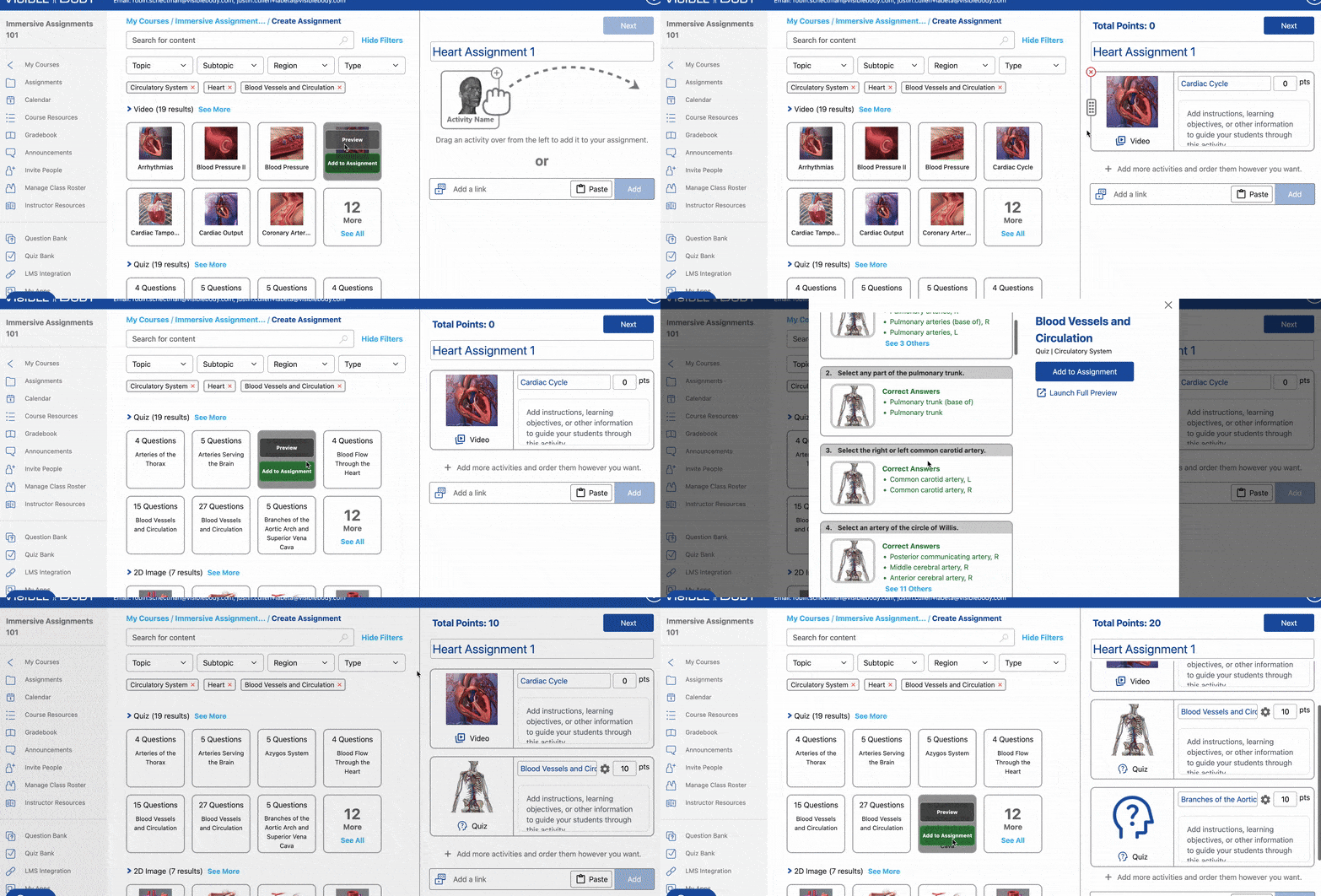
You can now preview individual assets when creating assignments! When building an assignment, hover over any assignable content to check out the new preview option. See a larger thumbnail, watch a video in full, read image description text, and see the full details of a quiz without having to load it in a new tab. To preview in 3D, select Launch Full Preview, and the asset will launch in a new tab.
We’ve also added new content you can assign!
Four new biochemistry models:
- Sodium Atom
- Chlorine Atom
- Ionic Bonding
- Covalent Bonding
And five new 3D Lessons on biochemistry topics:
- Atoms
- Electron Shells
- Charged Particles
- Chemical Bonding: Ionic Bonds
- Chemical Bonding: Covalent Bonds
Finally, as always, we’ve fixed bugs and made other improvements.
4.104 (July 10, 2025)
Visible Body Updates
Courseware Updates: Bug fixes and improvements.
4.103 (June 30, 2025)
Visible Body Updates
Courseware Updates: Bug fixes and improvements.
VBS Product 6.0 (June 11, 2025)
Introducing Visible Body Suite 6.0 — now with biochemistry content!
- Dive into the world of atoms with four new interactive biochemistry simulations.
- Learn about atomic structure with the new sodium and chlorine atom simulations.
- Explore ionic and covalent bonding to see how sodium chloride and water molecules are formed.
- And as always, we've fixed some bugs and made performance improvements.
VBS Product: Human Anatomy Atlas 2026.0.19 (June 2, 2025)
What's New in Human Anatomy Atlas
The info box has undergone some major changes!
- Similar features have been organized into collapsible sections.
- The hierarchy listing lets you see the organizational systems of any 3D structure.
- Interactive features like Isolate Anatomy and Radius Blast are in one place.
- Accessibility functionality means you can use your device's screen reader and keyboard to interact with the app.
- Now you can turn any 3D view into a Gross Anatomy Lab view with the tap of a button! Use standard anatomical positioning, or arrange a 3D model in prone or supine position.
- The Patient Education in-app purchase now includes 4 new animations!
- Minor improvements and bug fixes.
4.101 (May 27, 2025)
Visible Body Updates
Courseware Updates: Bug fixes and improvements.
4.99 (April 24, 2025)
New Content for New Assignments
New Assignments have been updated with more content, more flexibility, and more ways to bring anatomy to life! We’ve added:
- Anatomical Terminology illustrations covering introductory topics like terms of direction, planes and positions, regions, and more.
- Anatomical Variant illustrations depicting “classic” anatomy vs. common variations.
- Improved, more life-like skin textures for our Pig and Frog models.
- The ear model is now dissectible!
- The Gliding Joints animation now spotlights the foot’s tarsometatarsal joints.
- Plus, lots of small anatomy, texture, and text improvements.
You can now switch full-body views into Gross Anatomy Lab (GAL) mode—stand the model upright, lay it face up (supine) or face down (prone), and turn the dissection table on or off for maximum flexibility. And of course, we’ve fixed bugs and made other improvements.
4.97 (April 14, 2025)
Info Box and Accessibility Updates for New Assignments
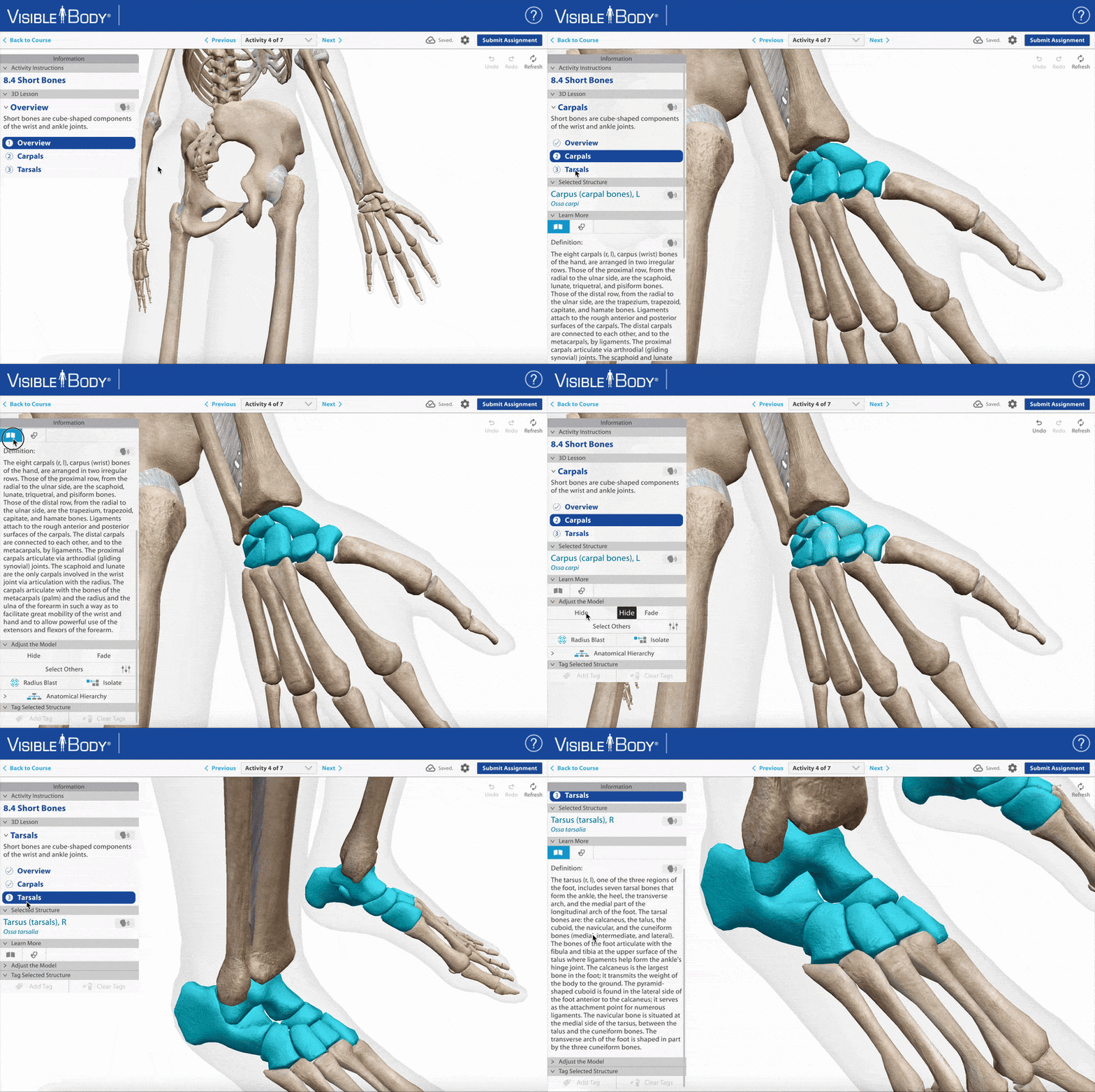
We’ve updated the info box in our new assignments to make it easier to read, more accessible, and smoother to use. This will include activity instructions, info text, and structure information in A&P lessons. The info box is now wider and scrolls seamlessly, with more space for instructions and informational text to display content clearly. It’s easier than ever to find what you need while working through an assignment!
All parts of the info box now support screen readers and respond to font size and color theme settings. The systems tray in new assignments, which allows you to fade, hide, or show any structure in a view, is also now screen reader accessible.
And as always, we’ve fixed bugs and made other improvements.
4.96 (April 10, 2025)
LTI 1.3 Updates
The Courseware team has released several updates to improve our LTI 1.3 integration across our LMSs! Visible Body’s LTI 1.3 integration is currently available for Canvas, Blackboard, D2L, Schoology, and Moodle. For more information about our integrations see here.
And of course, we fixed bugs and made other improvements.
VBS Product 5.5.22 (March 26, 2025)
Illustrations of Anatomical Variants and Terminology!
- New anatomical terminology illustrations covering introductory topics such planes, anatomical positions, and directional terms.
- New illustrations depicting "classic" anatomy vs. common variations. Find these in the Human Anatomy section under the "Anatomical Terminology" heading.
- Now you can turn any 3D view into a Gross Anatomy Lab view with the tap of a button! Use standard anatomical positioning, or arrange a 3D model in prone or supine position.
- Bug fixes, enhancements, and various improvements.
4.94 (March 24, 2025)
4.90 (February 27, 2025)
LMS Grade Sync Updates
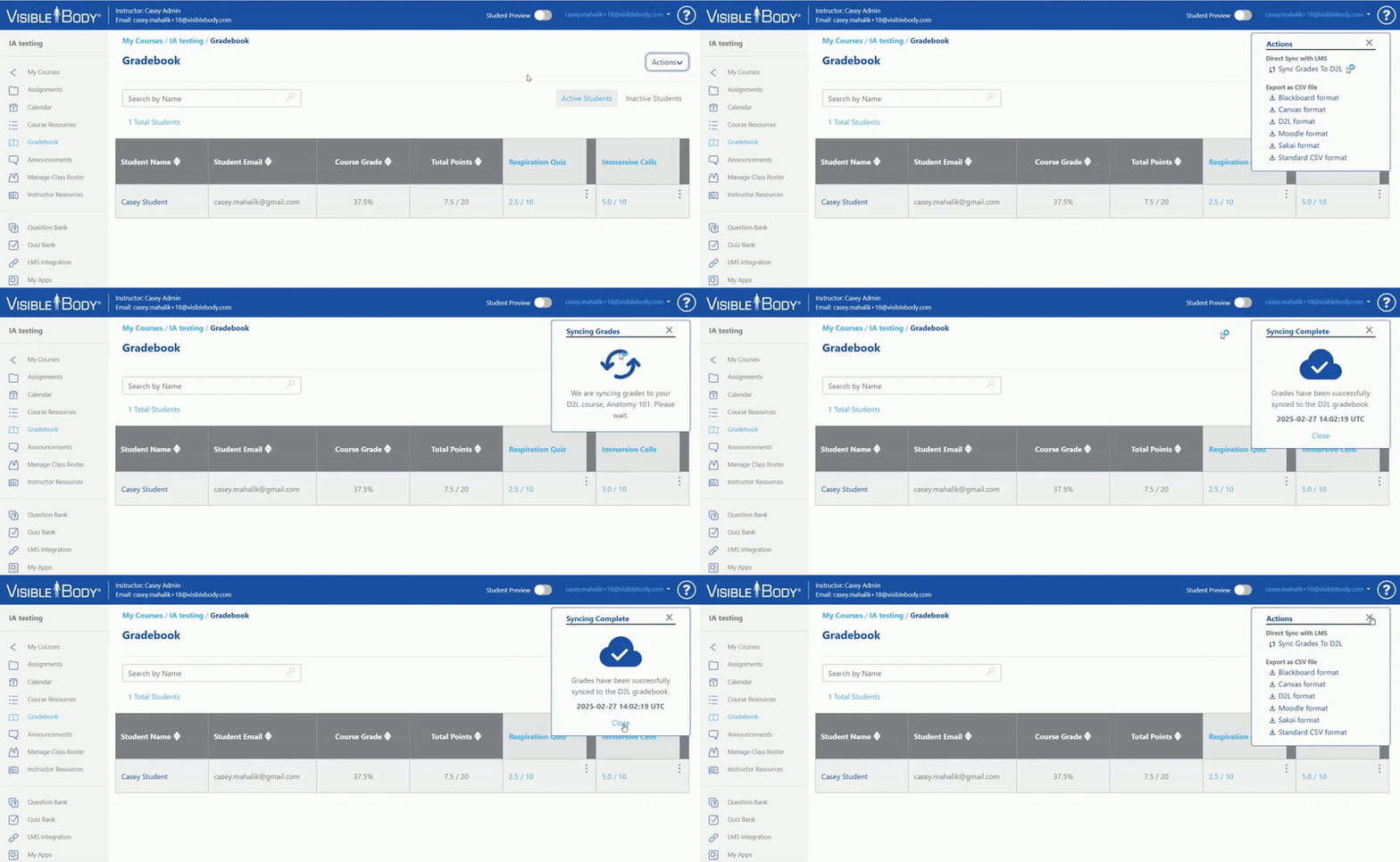
Instructors using our latest LTI 1.3 integration can now manually sync grades to their LMS! This feature will be available once an instructor adds links with gradebook return to their LMS course, and can be found on the Courseware gradebook page in your integrated course.
And as always, we fixed bugs and made other enhancements.
4.90 (February 25, 2025)
Visible Body Updates
Courseware Updates: Bug fixes and improvements.
VBS Product 5.4.58 (February 24, 2025)
Updates to Visible Body Suite
The info box in VB Suite has undergone some major changes! Here's what's new:
- Similar features have been organized into collapsible sections.
- The hierarchy listing lets you see the organizational systems of any 3D structure.
- Interactive features like Isolate Anatomy and Radius Blast are in one place.
- Accessibility functionality means you can use your device's screen reader and keyboard to interact with the app.
Also, we have fixed some bugs and made minor improvements and enhancements throughout VB Suite.
4.88 (February 10, 2025)
Student Review Mode for New Assignments
Instructors can now choose whether to allow students to access, review, and practice assignments after the due date passes!
- If Review Mode is toggled on, students can launch an assignment after the due date in to go through the learning materials and practice any quizzes.
- Students will see Review Mode in the top right of the navigation bar, where the Submit Assignment button usually is.
- No results, session data, or time on task is tracked while in review mode.
- This setting is on by default.
We’ve also updated the loading screen for New Assignments, with a fresh design and a loading bar to give you a better idea of the progress as your assignment loads. And as always, we’ve fixed bugs and made other enhancements.
4.87 (January 30, 2025)
Visible Body Updates
Courseware Updates: Bug fixes and improvements.
4.86 (January 22, 2025)
Updates to New Assignments
Visible Body has added a few key changes to our new assignments to make them even easier to use!
You can now use individual student settings and overrides for the new assignments. Go to the gradebook, select any new assignment grade for the relevant student, select the "Edit" button, and make your changes for that student. Potential options include:
- Change the assignment due date.
- Give them additional attempts on any quiz activities.
- Manually change the grades for any activities.
- Changed grades, due dates, and attempts for individual students are all marked with an asterisk.
- The point total is now on the instructor overview page for new assignments.
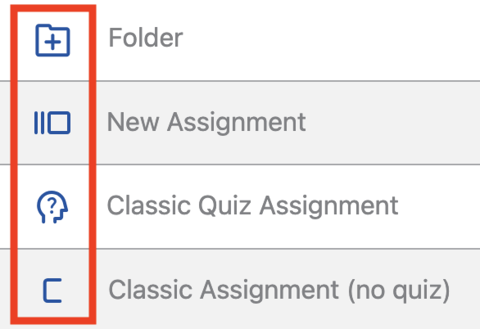
- And finally, new assignment icons! Visible Body now has different icons for new assignments, classic quizzes, and classic assignments.
And as always, we’ve made other bug fixes and enhancements.
4.85 (January 9, 2025)
4.83 (December 12, 2024)
Accessibility Update and New Content
This is Visible Body's biggest accessibility release yet!
Instructors and administrators can add Courseware’s new adapted Anatomy and Physiology essentials course to their Visible Body account to review the extensive accessibility features added to New Assignments.
The adapted A&P course demonstrates how students can complete visual and interactive coursework using screen reader and keyboard controls to:
- Navigate through 3D lessons, slideshows, and quiz activities in new assignments.
- Select structures in A&P 3D Lessons.
- Read aloud assignment overviews, activity instructions and info/about visual assets.
- Take multiple choice quizzes.
Keyboard controls are also now available for the assignment builder used by instructors and admins.
What's more, Visible Body's New Assignments now includes new pregnancy and men's reproductive health content, including four new 3D Lessons! Those are:
- Pathway of Sperm
- Prostate Cancer
- Pregnancy Changes I
- Pregnancy Changes II
And as always, we’ve made other bug fixes and enhancements.
4.82 (December 9, 2024)
LTI 1.3 Editing Updates and New Moodle Integration!
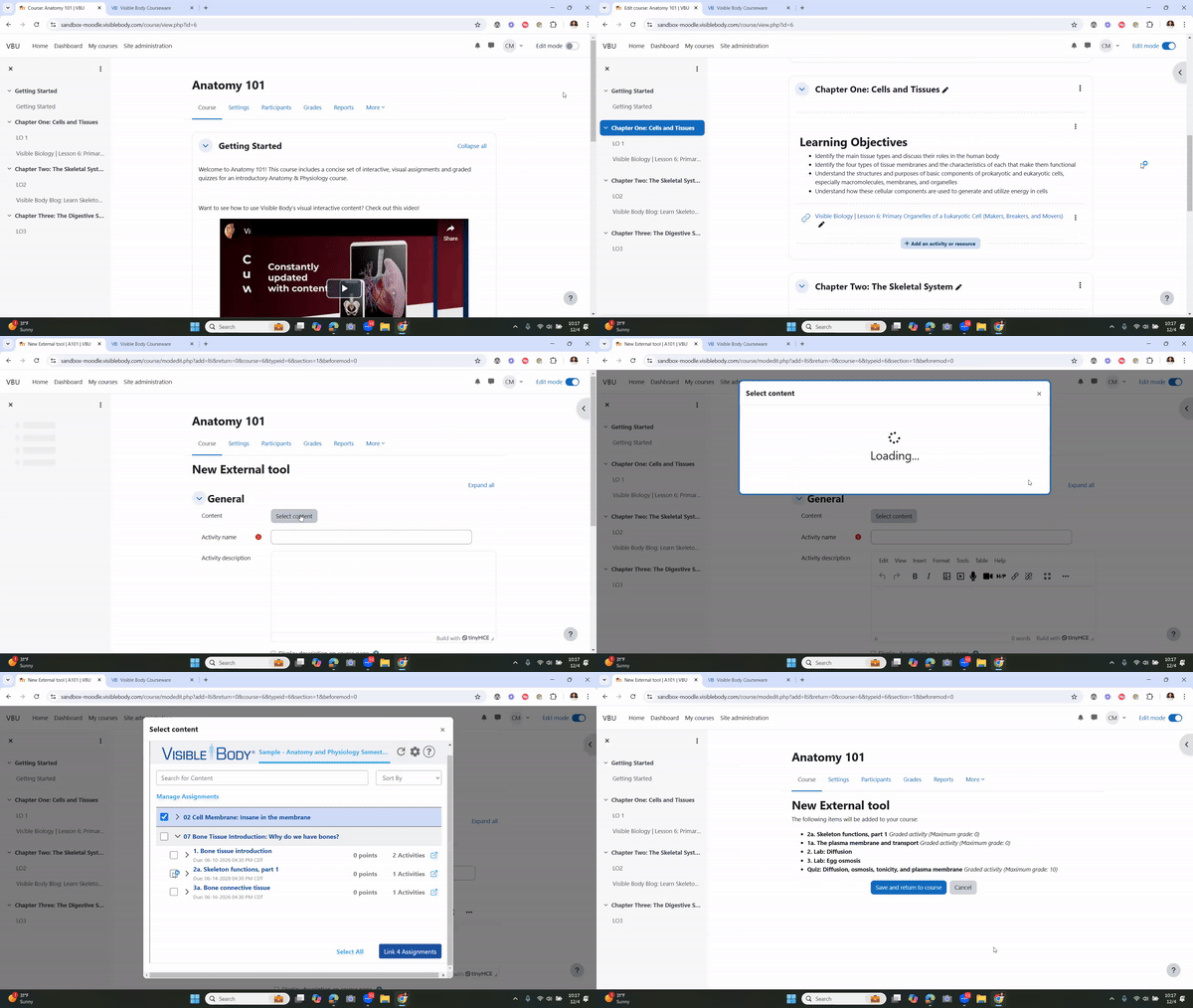
A new integration with Moodle is available! Our LTI 1.3 integration includes:
- An easy setup and SSO experience.
- A new deep linked assignment picker, which allows instructors to select assignments within their connected course to automatically upload into Moodle.
- Automatic grade return for all deep linked assignments.
- A new Courseware Home.
- Automatic access for students and co-instructors in one or more linked sections. Admins or lead instructors won’t need to invite or manage them outside Moodle.
We’ve also updated our editing experience for deep links! Now, it’s even easier to edit and manage your assignments without leaving your LMS, and there’s a simple, one-click way to access Courseware for more advanced editing.
And as always, we’ve made other bug fixes and enhancements.
The LTI 1.3 Courseware integration is in V1 testing for Canvas, Blackboard, D2L, Schoology, and Moodle. For more information about our LTI 1.3 integration see here.
Interested in trying our integration? Reach out to your VB education team contact, or send a request through the support team.
VBS Product 5.3.10 (November 7, 2024)
Explore more reproductive content in our latest update!
- 30-week fetus model: See how the body changes during the final trimester of pregnancy.
- Testis model: Learn about the spermatic cord and the pathway of sperm.
- Prostate cancer 3D lesson: See how male reproductive and urinary systems are affected.
- Slideshow: Learn how layers of the abdominal wall form the male or female inguinal canal.
And as always, we've made improvements and fixed bugs.
4.78 (November 4, 2024)
LTI 1.3 Integration Updates!
- Now, availability and due dates follow you, whether you edit first in Visible Body or revise in your LMS!
- Dynamic registration has been updated for Canvas integrations.
- The transfer students option is now easier to use, including a live search.
- Added LMS icons to linked assignments within Courseware.
- And finally, we now better accommodate both test and production LMSs, and improved our handling of multiple instances.
And as always, we’ve made other bug fixes and enhancements.
The LTI 1.3 Courseware integration is in V1 testing for Canvas, Blackboard, D2L, and Schoology. Along with the new Assignment Library, Visible Body (LTI 1.3) includes a “Visible Body Home” which features our most popular apps. For more information about our LTI 1.3 integration see here.
Interested in trying our integration? Reach out to your VB education team contact, or send a request through the support team.
VBS Product 5.2.24 (October 23, 2024)
See what's new in the latest Visible Body Suite Updates!
- Multiple choice quizzes are now available! Test your knowledge on a topic by selecting from multiple choice questions.
- All new A&P quizzes have been added to the Study section, as well as between most chapters in the Anatomy & Physiology section.
And as always, we've made improvements and fixed bugs.
4.76 (October 1, 2024)
LMS Assignment Library and Other Updates!
We’ve made updates to our LTI 1.3 integration, including:
- New Assignment Library design! Instructors will now easily be able to see which assignments they’ve already deep linked.
- Instructors can now edit the assignment’s points directly in the library!
- We’ve also updated our 1.1 integration to make it easier to use within the 1.3 framework, but we still recommend updating to the new 1.3 integration.
And as always, we’ve made other bug fixes and enhancements.
The LTI 1.3 Courseware integration is in V1 testing for Canvas, Blackboard, D2L, and Schoology. Along with the new Assignment Library, Visible Body (LTI 1.3) includes a “Visible Body Home” which features our most popular apps. For more information about our LTI 1.3 integration see here.
Interested in trying the assignment linking beta, and the rest of our V1 integration? Reach out to your VB education team contact, or send a request through the support team.
4.74 (September 19, 2024)
New Assignment Content!
Check out our updated content for our new assignments!
- 4-6 week embryo (3D model)
- 8-10 week fetus (3D model)
- Fetal circulation (3D lesson)
- Female Reproductive and Support Structures (3D model)
- Endometriosis (3D lesson)
- Uterus Positions (illustration)
Our Resource Center also features a folder in ‘Getting Started’ with two tutorial assignments that show off how to use our new assignments!
And, as always, we've made bug fixes, enhancements, and minor improvements.
4.73 (September 3, 2024)
New and Improved Assignments are Here!
- In these new assignments, students easily stay on track, navigating from one learning activity to another with short quizzes to check their learning along the way
Use one of our pre-made courses to get started with new assignments right away!
Easily edit premade assignments to fit your course’s learning objectives
- Search or browse additional content to add
- Reorder activities to your liking
- Customize assignments with your own instructions and other online resources
- Assign all of our newest content in one place, including 3D models of the neuron and ovary, pathologies like Alzheimer’s disease and PCOS, all of our amazing biology content, and more!
Questions about how this impacts your existing assignments? We have answers!
- Question: Can I still use all of my existing assignments?
- Answer: Yes! We haven’t gotten rid of any existing assignments. You can continue to use them, edit them, and make new copies.
- Question: Can I still make assignments with the old system?
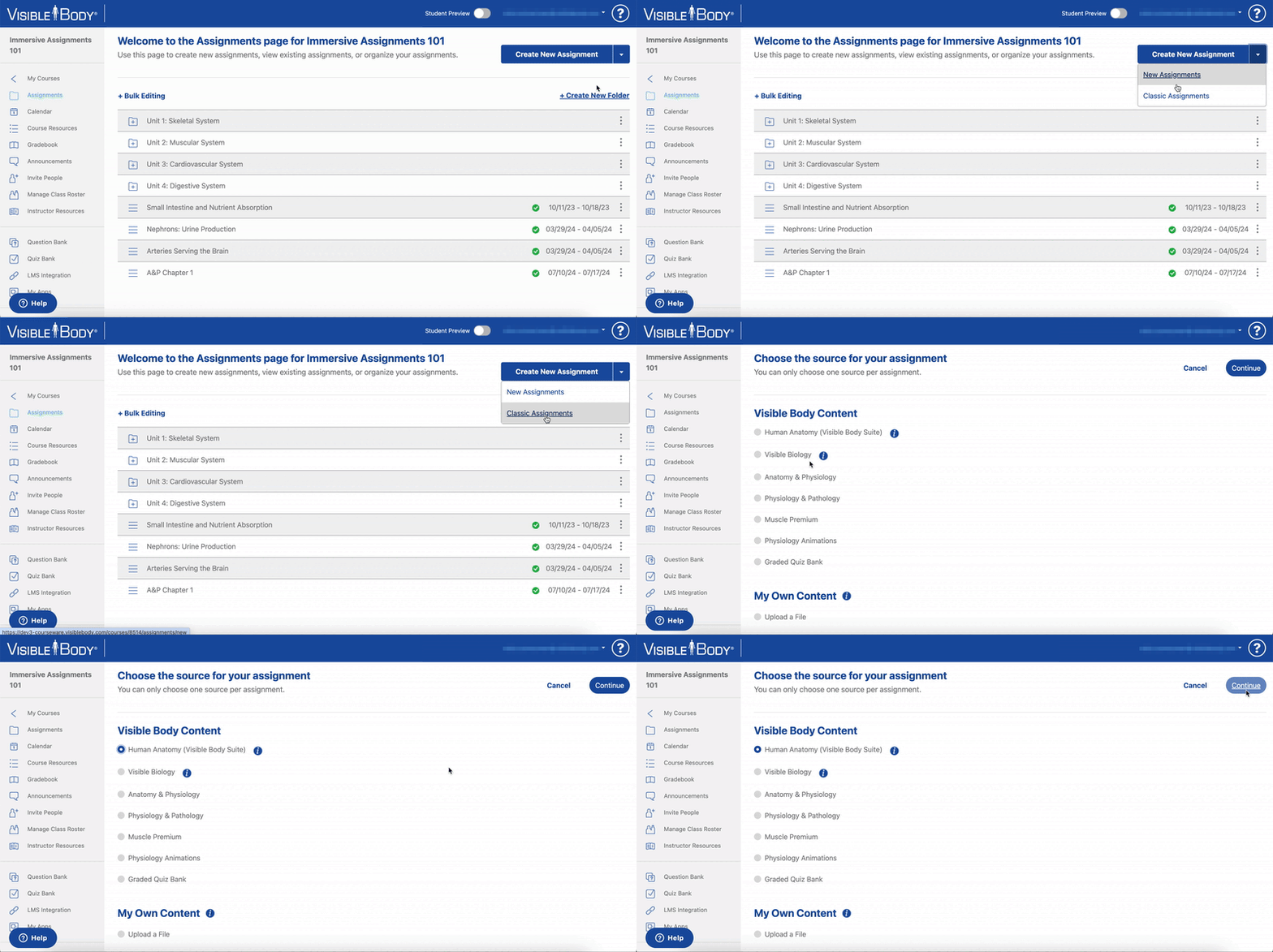
- Answer: Yes! Use the dropdown arrow next to the Create New Assignments button and select Classic Assignments and all of the options that you’re used to are still available.
- Question: Can I use the new assignments in the same course with my existing assignments?
- Answer: Yes!
- Question: How do I assign my custom flashcards, tours, and quizzes?
- Answer: Use the dropdown arrow next to the Create New Assignments button and select Classic Assignments. Choose Human Anatomy (Visible Body Suite) to assign your custom flashcards and tours, or Graded Quiz Bank to assign any quiz from the Quiz Bank.
VBS Product 5.1.18 (September 3, 2024)
Visible Body Suite Updates!
VB Suite's latest update offers an exciting look at fetal development with three all-new interactive 3D models!
- The embryo model shows the chorion, yolk sac, and the beginnings of the nervous, digestive, and circulatory systems.
- The fetus model includes internal organs, as well as the amniotic sac and placenta within the uterus.
- The fetal circulation model shows how the circulatory system of the fetus connects to the placenta and how various ducts help oxygenated blood bypass the developing lungs and liver.
The female reproductive system has been greatly enhanced and now includes:
- A new microanatomy 3D model depicting the uterus, vagina, uterine tubes, ovaries, and uterine ligaments.
- A new microanatomy 3D model of endometriosis to show how it can affect reproductive anatomy with different levels of severity.
- A new illustration covering anatomical variations of the position of the uterus.
And, as always, we've made bug fixes, enhancements, and minor improvements.
4.72 (August 26, 2024)
More Courseware Improvements and Updates!
Some more updates for fall start classes:
- Canvas integration update: We finalized our dynamic tool registration with Canvas, making it easy to set up our LTI 1.3 integration
- Added enhanced Safari messaging
- And as always, bug fixes and improvements
VBS Product 5.0.76 (August 12, 2024)
Visible Body Updates
Visible Body Suite Updates: Minor bug fixes and improvements.
4.70 (August 1, 2024)
Courseware Improvements and Updates!
Updates for the start of classes include improvements to reference content that comes with Courseware and new features and updates for instructors using the immersive assignments beta.
Redesign of reference content on the Courseware My Apps page and improved accessibility features:
- One click now gets students right into the web version of VB Suite or sends them a link to download the mobile app
Keyboard navigation and screen reader accessibility improvements to the My Apps page
Instructor and admin features added to the Immersive Assignments beta:
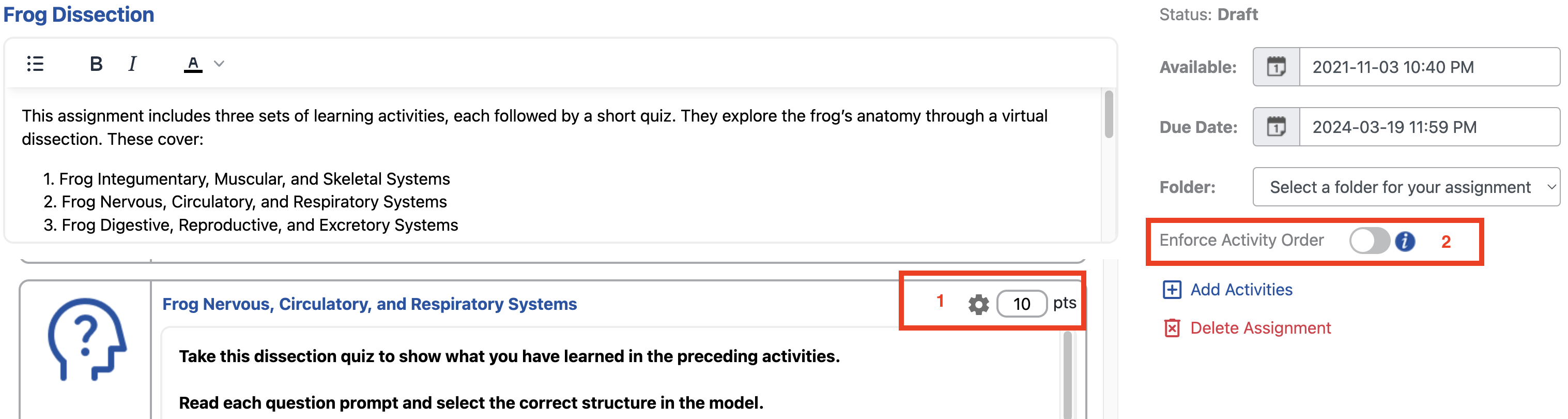
- Edit quizzes in three key ways: Choose quiz attempts (1, 2, 3, or unlimited), set points, edit name and instructions
- Select to enforce the activity order so that students cannot skip ahead without spending time on each activity
- Students enhancements to Immersive Assignments beta: slideshows and illustrations will have the about this view text open by default
Join the Immersive Assignments beta by opting in from the New Assignments tab in the Resource Center or within your user profile. Learn more about the Immersive Assignments beta here.
4.69 (July 15, 2024)
New Updates for our LTI 1.3 Integration!
Schoology has been added to our Visible Body (LTI 1.3) integration, as well as our deep linking beta. This includes:
- A new deep linked assignment picker, which allows instructors to select assignments within their connected course to automatically upload into their LMS.
- All published assignments from the connected course will appear in the assignment picker.
- Automatic grade return for all deep linked assignments.
The LTI 1.3 Courseware integration is in V1 testing for Canvas, Blackboard, D2L, and Schoology. Along with the new assignment picker, Visible Body (LTI 1.3) includes a “Visible Body Home” which features our most popular apps. This integration also includes single sign-on and automatic student account creation. For more information about our LTI 1.3 integration see here.
Interested in trying the assignment linking beta, and the rest of our V1 integration? Reach out to your VB education team contact, or send a request through the support team.
4.68 (July 11, 2024)
Anatomy and physiology lessons added to the immersive assignment builder!
The immersive assignment builder now includes hundreds of visual and bite-sized lessons that cover core topics in the anatomy and physiology course. This content is all from Visible Body's Anatomy and Physiology product that is now integrated with Courseware to make assignment building easier for instructors.
- All videos, 3D Lessons, illustrations, slideshows, and quizzes from Visible Body's Anatomy & Physiology product are available to add to an immersive assignment.
Join the Immersive Assignments beta by opting in from the New Assignments tab in the Resource Center or within your user profile. Learn more about the Immersive Assignments beta here.
VBS Product 5.0 (June 20, 2024)
Visible Body Suite Updates!
The Anatomy and Physiology app has been added to Visible Body Suite! Explore 50 virtual "chapters" that present topics taught in an introductory A&P course.
- There is a "chapter" for every body system
- Use the guided learning path to move through each lesson
- Share lessons with other VB Suite users with the QR code feature
- A&P is now available in Italian
We've also added quality of life improvements for sharing content, as well as major accessibility updates:
- A sharelink can be generated to the main menu for either A&P or Visible Body Suite
- Flashcards and tours are now fully screen reader and keyboard accessible!
Check out our video for more information about accessible content in Visible Body Suite.
4.66 (June 13, 2024)
New Updates for our LTI 1.3 Integration!
Deep linking is now available in beta for our Visible Body (LTI 1.3) integration. This includes:
- A new deep linked assignment picker, which allows instructors to select assignments within their connected course to automatically upload into their LMS.
- Automatic grade return for all deep linked assignments.
The LTI 1.3 Courseware integration is in V1 testing for Canvas, Blackboard, D2L, and coming soon to Schoology. Along with the new assignment picker, Visible Body (LTI 1.3) includes a “Courseware Home” which features our most popular apps. This integration also includes single sign-on and automatic student account creation. For more information about our LTI 1.3 integration see here.
Interested in trying the assignment linking beta, and the rest of our V1 integration? Reach out to your VB education team contact, or send a request through the support team.
4.64 (May 15, 2024)
More Immersive Assignments Updates!
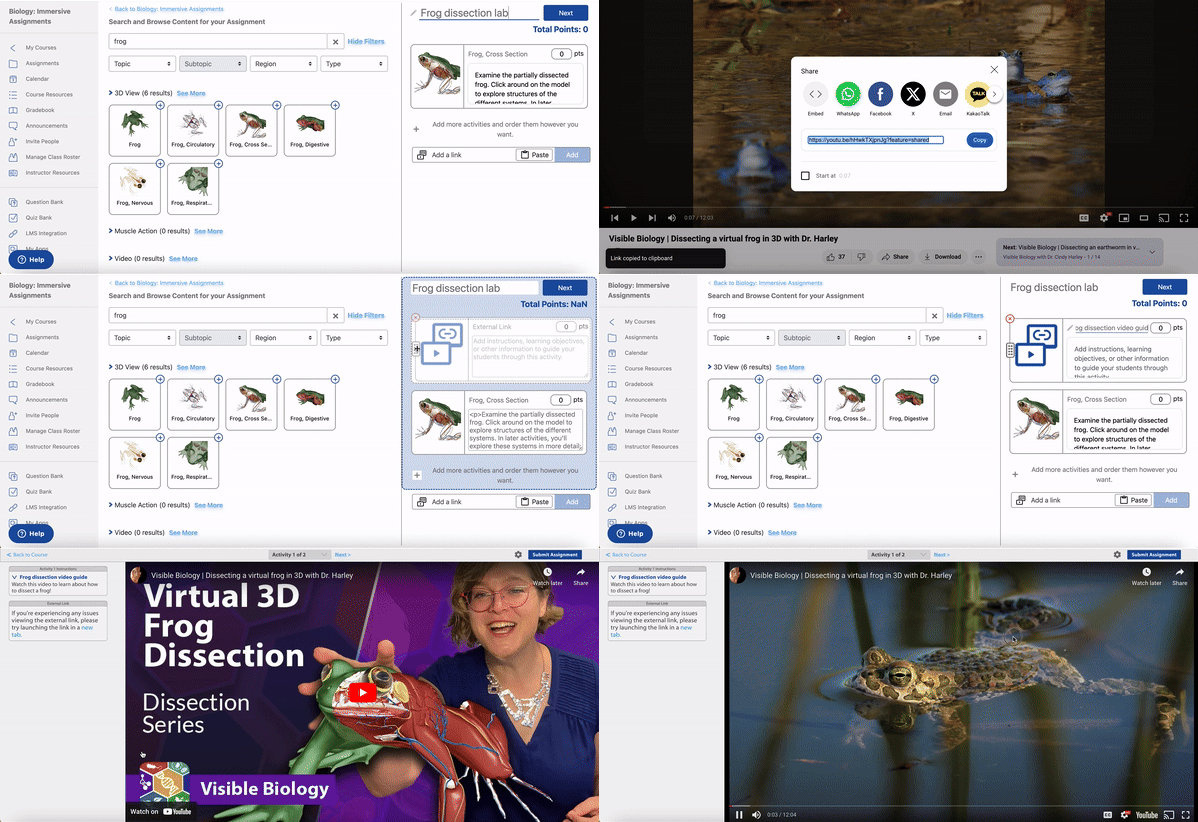
- You can now add links in your Immersive Assignments to other online resources. The link can be embedded within the assignment, or open in a new tab.
We’ve made several dissection quizzing improvements.
- The “Dissect” tool has been added, replacing “Hide Others.”
- Several design improvements have been implemented for a smoother experience.
- Immersive Assignments is now dark mode compatible.
- Finally, increased security has been added for quiz data.
Join the Immersive Assignments beta by opting in from the New Assignments tab in the Resource Center or within your user profile. Learn more about the Immersive Assignments beta here.
4.61 (April 4, 2024)
New Immersive Assignments Updates!
- Redesigned assignment preview page for students! It will now show the status and grade for every activity in the assignment, as well as launch the student straight into any activity by clicking it.
- Students can also navigate through slideshows, cross-sections, and 3D lessons with our new navigation! They can skip around and go out of order, and keep track of the slides, views, or sections they’ve already seen with a handy check mark.
- Instructors can now see how much time each student spent on each Immersive Assignment activity when you click on the grade in the gradebook!
- The default font size has been increased.
Join the Immersive Assignments beta by opting in from the New Assignments tab in the Resource Center or within your user profile. Learn more about the Immersive Assignments beta here.
VBS Product 4.7.36 (March 25, 2024)
Visible Body Suite Updates and New Content!
Visible Body Suite has received several accessibility updates! Users in accessibility mode can now use keyboard navigation to:
- Use menus to launch content
- Use content search
- View and navigate the 3D models
- Make and edit tours and decks
- Move through flashcard decks
- Control videos
- Move through subviews including tour stops, 3D lesson stops, preview mode for flashcard decks, and more
- Launch sharelinks, save favorites, and share content
- Finally, a “Listen” button has been added for histology slides and illustrations
Check out our video for more information about accessible content in Visible Body Suite.
We’ve also added four new endocrine animations:
- Negative feedback loops
- Positive feedback loops
- Water soluble hormones
- Lipid soluble hormones
- As well as a new endocrine illustration slideshow!
4.59 (March 20, 2024)
Even More New Content and Updates for Immersive Assignments!
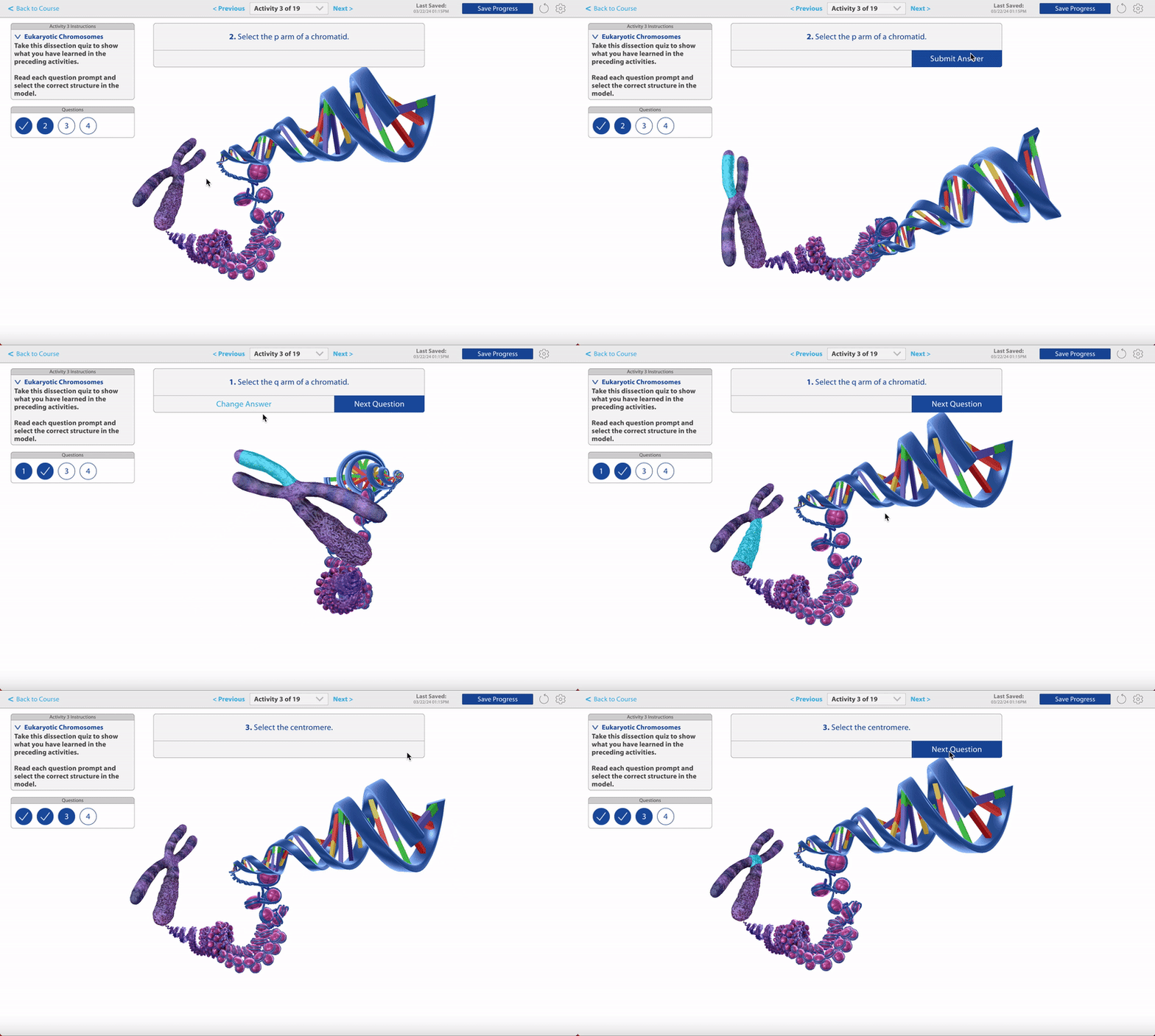
Immersive Assignments has even more new content to assign! This includes:
- All cross sections from VB Suite.
- Another big batch of biology dissection quizzes.
- Immersive Assignments has also been updated to allow instructors to assign points for any type of Immersive Assignment activity, giving students real credit for completing them!
- You can now see the grade details in the gradebook by clicking on the Immersive Assignment grade.
- Students can use the new quiz navigation panel to easily see which questions they've answered, skip questions and go back to them, go back and change their answers, and generally answer quiz questions in whatever order they want!
Join the Immersive Assignments beta by opting in from the New Assignments tab in the Resource Center or within your user profile. Learn more about the Immersive Assignments beta here.
4.58 (March 18, 2024)
Courseware and Integration Improvements
We've added the instructor community into the Resource Center! Instructors will be able to “Join our Community” from the Resource Center’s left hand navigation.
- Our integration error handling has been improved to make it easier to understand and fix problems.
4.57 (February 28, 2024)
New Content for Immersive Assignments!
Immersive Assignments now has even more content! this includes:
- A whole host of new dissection quizzes covering bony landmarks, the skin chunk model, and many biology models.
- All beating heart views and 3D lessons.
- Several new 3D views from Visible Body Suite.
- Instructors can also now change an Immersive Assignment grade in the gradebook.
- A few design updates to make the Immersive Assignments experience even easier.
Join the Immersive Assignments beta by opting in from the New Assignments tab in the Resource Center or within your user profile. Learn more about the Immersive Assignments beta here.
4.55 (February 8, 2024)
New integration with Blackboard and other Courseware improvements!
The LTI 1.3 Courseware integration with Blackboard is available! Similar to the integrations with Canvas, D2L, and Schoology, this will include:
A setup, account linking, and single sign-on (SSO) experience within Blackboard.
A new Courseware Home.
Automatic access for students and co-instructors in one or more linked sections. Admins or lead instructors won’t need to invite or manage them outside of Blackboard.
Ability to set up one-way links to Visible Body assignments.
Interested in trying the integration? Reach out to your VB education team contact, or send a request through the support team.
Courseware Improvements:
We've updated the first getting started video for instructors! It is available to instructors on the help screen inside Courseware. It can also be viewed here.
4.54 (February 5, 2024)
New Content for the Immersive Assignments Beta!
- Dissection quizzes are now available in Immersive Assignments!
The new short dissection quizzes will be used in the first Immersive Assignment pre-made course! Other new content includes:
- Meiosis and mitosis moving models.
- Phylogenetic tree model.
- 7 new evolution illustrations.
- New multiple choice quizzes.
- Instructors can also now change an Immersive Assignment grade in the gradebook.
Join the Immersive Assignments beta by opting in from the Resource Center or your user profile. Learn more about the Immersive Assignments beta here.
VBS Product 4.6.45 (January 24, 2024)
Update to Tours and Other Content!
- Tours are now editable! Users can add, remove, or rearrange the views in each tour.
- The tour creation process has been updated, and keywords can be added to make them easier to find in the new search field. Tours and flashcards can now be created from the flashcard menu.
- My Library and Study menus are now searchable as well.
- Animations, Illustrations, and Histology slides can now be shared.
Check out all these great new features in Visible Body Suite!
4.52 (January 11, 2024)
New integration with Canvas and other Courseware improvements!
The LTI 1.3 Courseware integration with Canvas is available in beta. Similar to the recently released beta integrations with D2L and Schoology, this beta includes:
A setup, account linking, and single sign-on (SSO) experience within Canvas.
A new Courseware Home.
Automatic access for students and co-instructors in one or more linked sections. Admins or lead instructors won’t need to invite or manage them outside of Canvas.
Ability to set up one-way links to Visible Body assignments.
Interested in trying the beta? Reach out to your VB education team contact, or send a request through the support team. Courseware Improvement:
We've updated the getting started video for students. It is available to students on the help screen inside Courseware. It can also be viewed here.
4.51 (December 21, 2023)
IA improvements, gradebook user updates, and more!
- Immersive Assignment grades can now sync along with all other grades via Canvas deep integration.
- Instructors can now preview their IAs anytime, even if the due date has passed.
- Maintenance fixes and back-end updates.
Gradebook updates:
- The old arrow-style dropdown menu has been replaced with a 3-dot menu.
- Added hover states for a more modern look and feel.
- Fixed an issue with the standard CSV gradebook export.
Courseware first release in 2017. Release notes between then and November 2023 are archived.