If you are not familiar with using HTML, the following information might be useful:
- HTML is a markup language with tags enclosed in angle brackets
<>. Most HTML tags have a start tag that identifies the formatting to be applied and a matching end tag that begins with a forward slash, for example,
<b>your_content_here</b>When the < and & characters are followed by a letter, you must use a character entity reference to prevent these characters from being interpreted as HTML markup.
To type <, type <
To type &, type &
Most spaces and line breaks are considered unimportant for HTML formatting and are ignored.
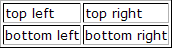
See the following table for examples of some of the most commonly used formatting. Formatting Example Code Display Bold <b>bold text</b> bold text Italics <i>italic text</i> italic text Underline <u>underlined text</u> underlined text Subscript text<sub>subscript </sub> textsubscript Superscript text<sup>superscript</sup> textsuperscript Line break line<br>new line line new line New paragraph paragraph<br><br>new paragraph paragraph new paragraph Indented text text <div class='indent'>indented</div> Centered text text <div class='center'>centered</div> Right-aligned text text <div class='right'>right-aligned</div> Bulleted list <ul> <li>first list item</li> <li>next list item</li> <li>last list item</li> </ul> first list item next list item last list item Numbered list <ol> <li>first list item</li> <li>next list item</li> <li>last list item</li> </ol> first list item next list item last list item Simple table - no borders <table> <tr><td>top left</td><td>top right</td></tr> <tr><td>bottom left</td><td>bottom right</td></tr> </table> 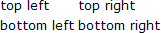 Simple table - with borders <table border="1"> <tr><td>top left</td><td>top right</td></tr> <tr><td>bottom left</td><td>bottom right</td></tr> </table>