The postcalc() function lets you define a variable in Question that holds the code that you want to evaluate in Answer. You can pass values to your code, and postcalc() returns the result of the last statement in your code. This helps you accomplish two things:
- You can define a complex, multi-line algorithm that is evaluated to define an answer key based on your student's responses to other parts of the question.
- You can reuse a formula with different values for multiple lines in your answer key.
If needed, open your question in the Question Editor.
Some questions are not searchable because of their Permission settings.
If
Do this
You know the question ID or name
- In the search box at the top of the page, select Question.
- Type the question name or ID and press Enter.
You own the question
- Click Questions › My Questions.
- Click the question name.
You organize your questions in folders
- Click Assignments › Folders and navigate to the folder with the question.
- Click the question name.
You want to use advanced search
- Click Questions › Search Questions.
Enter the search criteria you want to use.
To view only your questions, click me next to Author.
- Click Search.
If you own the question, click Edit next to your question.
If you do not own the question, click View, then click Open in Editor under Previewer Tools.
Add the following code at the beginning of Question:
<eqn include('/userimages/feedback/physlabs1.pl')>This code is required in order to use the
postcalc()function.In Question, define a variable that contains the code that you want to be evaluated in your answer key. For example:
<eqn>
$mycalc='decform($a**2 + $b**2,3)';
''
</eqn>
Your code can include multiple statements, and you can format it using multiple lines.
Values that are passed to your code from the
postcalc()function are assigned to the special variables$_[0],$_[1], and so on.In Answer, add the
postcalc()function where your code should be evaluated. For example:<EQN postcalc($mycalc)>To pass values to your code, list them after the variable that contains your code. For example:
<EQN postcalc($mycalc,6)>The
postcalc()function returns the result of the last statement in your code, so you can use it for variable assignment. For example:<EQN $mychoices[2] = postcalc($mycalc,6)>Click Test/Preview to test the appearance and behavior of the question. See Test Questions.
When your question displays and functions correctly, click Save.
Example Question Using postcalc() to Calculate the Answer Key The following table summarizes an actual question. QID 1589522 Name Template2 3.POSTC.01 Mode Numerical Question <eqn include('/userimages/feedback/physlabs1.pl')> <eqn> %total_feedback = (low => "Count more cells for an accurate sample."); %ID_feedback = (low => "Check your identification.", high => "Check your identification."); $calc_range = '$LINK=\'box_total: no_icon\'; decform(userinput(max(0,$total*($_[0]-0.05)), $total*($_[0]+0.05), $total*$_[0], \%ID_feedback),0)'; '' </eqn> View the slide of an onion root tip and count the cells in each phase of cell division. <br><br> <table frame="void" rules="none" border="0"> <tr><th>TOTAL</th><td><_></td></tr> <tr><th>Interphase</th><td><_></td></tr> <tr><th>Prophase</th><td><_></td></tr> <tr><th>Metaphase</th><td><_></td></tr> <tr><th>Anaphase</th><td><_></td></tr> <tr><th>Telophase</th><td><_></td></tr> </table> Answer <EQN $LABEL='box_total'; $total=decform(userinput(60,1000,100,\%total_feedback),0)> {tab} 0 <EQN $LABEL='box_inter'; $inter=postcalc($calc_range,0.56)> {tab} 0 <EQN $LABEL='box_proph'; $proph=postcalc($calc_range,0.28)> {tab} 0 <EQN $LABEL='box_metap'; $metap=postcalc($calc_range,0.08)> {tab} 0 <EQN $LABEL='box_anaph'; $anaph=postcalc($calc_range,0.06)> {tab} 0 <EQN $LABEL='box_telop'; $telop=postcalc($calc_range,0.03)> {tab} 0 Display to Students 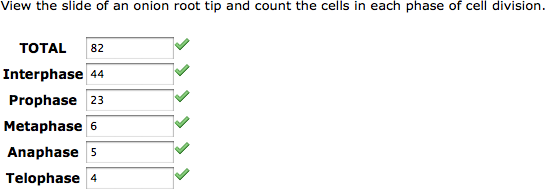 Example Question Using postcalc() to Parse Responses The following table summarizes a question that uses
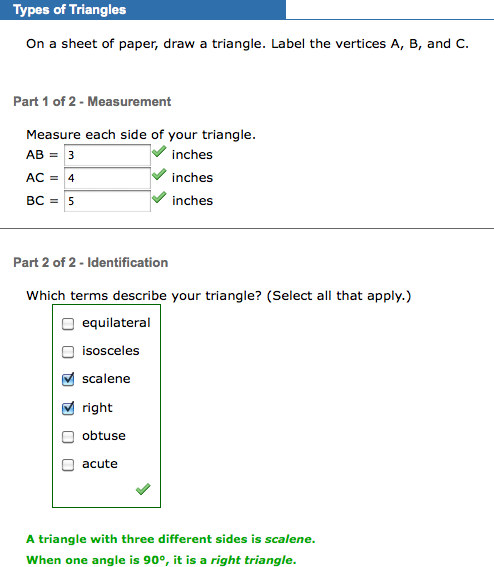
 postcalc() to determine characteristics of the student's triangle based on the lengths of its sides. QID 1589514 Name Template2 3.POSTC.02 Mode Multi-Mode...NS Question <eqn include('/userimages/feedback/physlabs1.pl')> <eqn> @clues=(' ', 'Are all three sides equal?', 'Are two sides equal?', 'Are any sides equal?', 'Is there a right angle?', 'Is there an obtuse angle?', 'Are all the angles acute?'); @reinforcement=(' ', 'A triangle with three equal sides is <i>equilateral</i>.', 'A triangle with two equal sides is <i>isosceles</i>.', 'A triangle with three different sides is <i>scalene</i>.', 'When one angle is 90°, it is a <i>right triangle</i>.', 'When one angle is greater than 90°, it is <i>obtuse</i>.', 'When all angles are less than 90°, it is <i>acute</i>.'); $triangle=' @squares = sort {$a <=> $b} ($AB**2,$AC**2,$BC**2); if (@squares[0] == @squares[2]) {@choices=(1,2)} elsif (@squares[0] == @squares[1]) {@choices=(2)} elsif (@squares[1] == @squares[2]) {@choices=(2)} elsif ((@squares[0]!= @squares[1]) && (@squares[0]!= @squares[2]) && (@squares[1]!= @squares[2])) {@choices=(3)} if (abs(@squares[2] - @squares[1] - @squares[0]) < @squares[2] * 0.05) {@choices=(@choices,4)} elsif (@squares[2] > @squares[0] + @squares[1]) {@choices=(@choices,5)} elsif (@squares[2] < @squares[0] + @squares[1]) {@choices=(@choices,6)} $HINT=join(\'<br>\',@clues[@choices]); $CORRECT_HINT=join(\'<br>\',@reinforcement[@choices]); $ORDERED=[@choices] '; '' </eqn> <tutorial order="ascending" skip="no"> <premise title="Types of Triangles"> On a sheet of paper, draw a triangle. Label the vertices A, B, and C. </premise> <step title="Measurement"> Measure each side of your triangle. <br> AB = <_> inches<br> AC = <_> inches<br> BC = <_> inches </step> <step title="Identification"> <SECTION>Which terms describe your triangle? (<p:selectall>)<br> <_> </step> </tutorial> Answer <EQN $AB=userinput(1,100,5)> <EQN $AC=userinput(1,100,5)> <EQN $BC=userinput(1,100,5)> <SECTION><EQN postcalc($triangle); ''>equilateral isosceles scalene right obtuse acute Display to Students