Many eBooks share some of the following characteristics:
- eBooks generally include the complete text of the printed textbook, along with all figures and illustrations.
- eBooks usually have a table of contents that you can click to navigate to specific chapters or sections.
- You can usually search for text in eBooks.
- You can usually navigate to a specific page number by typing the page number in a text box.
- You can often bookmark pages in the eBook.
- You can often add highlighting and notes to the eBook. Your highlighting and notes are saved between sessions and are available to you anytime when you open the eBook.
- You can usually zoom in and out when viewing the eBook.
- You can sometimes click on links in the eBook which open media such as videos. Some of these additional media are interactive.
- You can usually print pages from the eBook.
- You can sometimes save the eBook to your computer for offline viewing.
- You can sometimes use an interactive glossary or click on certain terms in the text to view the glossary definition.
- Often the eBook will have a toolbar for navigating the eBook and implementing its various features.
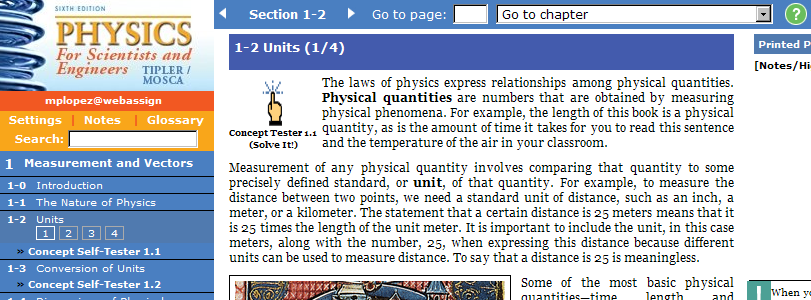
The following figures illustrate some of the differences among eBooks. An eBook that opens each section in a separate window or browser tab: 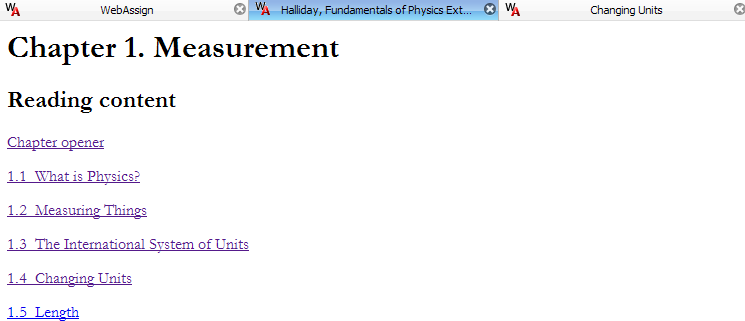 An eBook that includes the navigation, content, search, and other features on a single Web page: