
Copy the Web address of the image or uploaded image file.
Browser
Steps
Microsoft Edge
- Right-click either the file name of your uploaded file or an image displayed in a Web page and click Copy Image Link.
Safari
- To copy the address of your uploaded file, right-click the file name and click Copy Link.
- To copy the address of an image displayed in a Web page, right-click the image and click Copy Image Address.
Chrome
- To copy the address of your uploaded file, right-click the file name and click Copy Link Address.
- To copy the address of an image displayed in a Web page, right-click the image and click Copy Image URL.
Click in the Show My Work box where you want to insert the image.
Click
 .
.Paste the Web address of the image into URL and click OK.
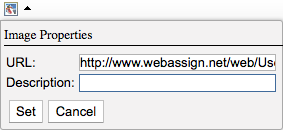
Type a Description of the image.
The image is displayed.