

Spark Student Help
- The Online Placement Test is timed. The timer starts when you open the test.
- It includes questions for grammar, vocabulary, listening, and reading.
- There are three short speaking activities. Make sure your microphone is working properly.
- You have one try to take the test.
- The Online Placement Test is not available on the mobile app. You must use a browser to access and take the test.
Video Tutorial: Take the Online Placement Test
Sign in to Spark.
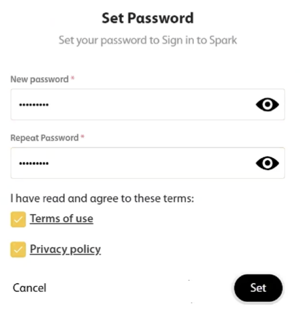
If prompted, set a new password.
Select Term of use and Privacy policy.
Click Set.
In the Assignments tab, click the Online Placement Test assignment.
The test instructions will display.
Click Start Test to begin.
Follow the instructions for each question to complete the test.
- Click
 to go to the next question.
 - For listening activities, click Play to listen.
For speaking activities, click Record to record your answer.
Be sure to have a working microphone.
Click Stop when you are done recording your answer.
- Click
Click
 when it appears to submit your answers.
Your score will be sent to your instructor.