
CNOWv2 Instructor Help
- LMS Course Setup
To use the Course Hub in your LMS, add a link the same way you would an assignment.
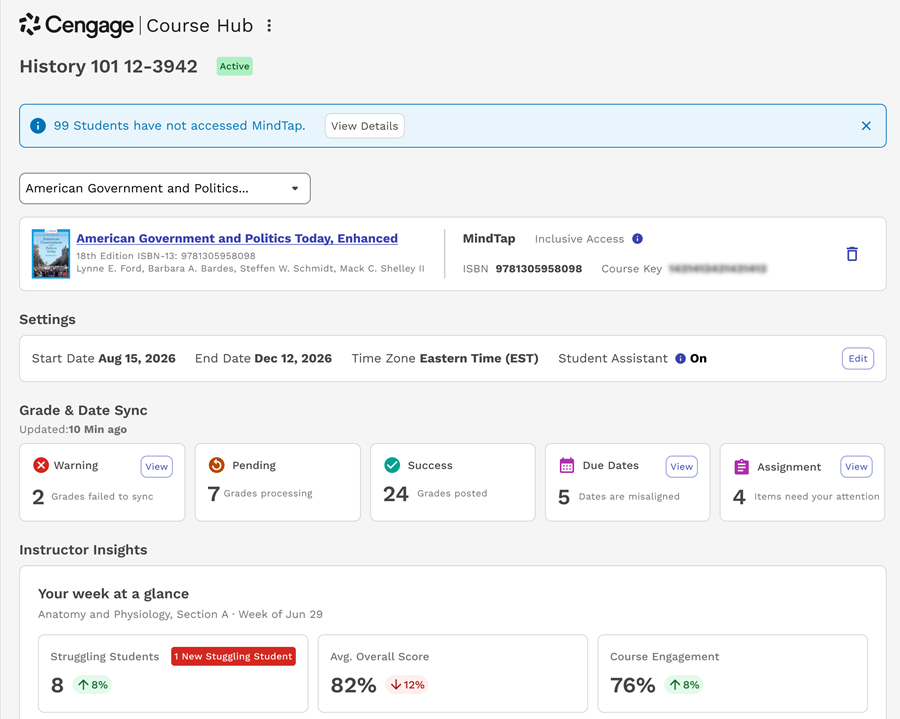
Instructor Insights
The Instructor Insights panel shows highlights from your Instructor Assistant dashboard such as the average class score and students that are struggling in recent assignments. Click View full insights to launch the complete dashboard.
Grade & Date Sync
The Grade & Date Sync panel provides updates on grade and date syncing between CNOWv2 and your LMS.
To view more information about an alert, click View.
Student Activity Alerts
Course Hub displays an alert if students have not accessed CNOWv2 content within 15 days of the course start date. To see which students have not accessed assignments or course materials, click View Details.
Student View
Students can use the Course Hub for quick access to the eBook, upcoming CNOWv2 assignments, and the student assistant if enabled.