
WebAssign Student Help
- Sign In / Account
General Entry
Notation | Keyboard |
|---|---|
Decimals | . |
Variables | Type variables exactly as given in the question. Variables are case-sensitive. You can't substitute |
Operations
Notation | Button | Button Group | Keyboard (if available) |
|---|---|---|---|
Addition | + | Operations | + |
Multiplication | × | Operations | * |
Fractions |  | Operations | / |
Square root |
| Operations | |
Base or subscript |
| Operations |
|
|
| Operations | |
Exponential function |
| Operations | e^ |
Power of 10 |
| Operations | 10^ |
General Log |  | Operations | log_ |
Subtraction | − | Operations | - |
Division | ÷ | Operations | |
Exponent |
| Operations | ^ |
Factorial |
| Operations | ! |
Exponent and subscript of a variable |
| Operations |
|
Absolute value |
| Operations | | |
Natural logarithm | ln | Operations | ln |
Logarithm (base 10) | log | Operations | log |


Relations and Sets
Notation | Button | Button Group | Keyboard (if available) |
|---|---|---|---|
Less than | < | Relations | < |
Greater than | > | Relations | > |
Less than or equal to | ≤ | Relations | <= |
Greater than or equal to | ≥ | Relations | >= |
Equal | = | Relations | = |
Not equal | ≠ | Relations | |
Open interval (parentheses) |
| Relations or Sets | ( The closing parenthesis is added automatically. |
Closed interval (brackets) |
| Relations or Sets | [ The closing bracket is added automatically. |
Half-closed interval (half-open interval) |
| Relations or Sets | [) Substitute (or ] as needed. |
Set delimiters (braces) |
| Relations or Sets | { The closing brace is added automatically. |
Intersection | ⋂ | Relations or Sets | |
Union | ⋃ | Relations or Sets | |
Empty set | ∅ | Relations or Sets | |
No solution |
| Relations |


Symbols and Other
Notation | Button | Button Group | Keyboard (if available) |
|---|---|---|---|
Script E |  | Other | |
Infinity | ∞ | Other or Symbols | |
hbar |  | Other | |
Imaginary unit | i | Other or Symbols | i |
Script l |  | Other | |
theta |  | Other or Symbols | |
phi |  | Other | |
pi |  | Other or Symbols | |
omega |  | Other | |
Does not exist |  | Other | |
Undefined |  | Other or Symbols | |
Degrees |  | Other or Symbols |
Trig
Typing a function name such as sin automatically adds parentheses to delimit the argument of the function.
Alternative notations for trigonometric functions such as arcsin and sin−1 are accepted.
Notation | Button | Button Group | Keyboard (if available) |
|---|---|---|---|
Sine | 
or sin | Trig | sin |
Cosine | 
or cos | Trig | cos |
Tangent | 
or tan | Trig | tan |
Cosecant | 
or csc | Trig | csc |
Secant | 
or sec | Trig | sec |
Cotangent | 
or cot | Trig | cot |
Inverse sine (arcsine) | 
or sin −1 | Trig | arcsin or sin ←^-1 |
Inverse cosine (arccosine) | 
or cos −1 | Trig | arccos or cos ←^-1 |
Inverse tangent (arctangent) | 
or tan −1 | Trig | arctan or tan←^-1 |
Inverse cosecant (arccosecant) | 
or csc −1 | Trig | arccsc or csc←^-1 |
Inverse secant (arcsecant) | 
or sec −1 | Trig | arcsec or sec←^-1 |
Inverse cotangent (arccotangent) | 
or cot −1 | Trig | arccot or cot←^-1 |
Hyperbolic sine |  | Trig | sin ←h |
Hyperbolic cosine |  | Trig | cos ←h |
Hyperbolic tangent |  | Trig | tan ←h |
Hyperbolic cosecant |  | Trig | csc ←h |
Hyperbolic secant |  | Trig | sec ←h |
Hyperbolic cotangent |  | Trig | cot ←h |
Inverse hyperbolic sine (area hyperbolic sine) |  | Trig | arcsin←h or sin←h^-1 |
Inverse hyperbolic cosine (area hyperbolic cosine) |  | Trig | arccosh←h or cos←h^-1 |
Inverse hyperbolic tangent (area hyperbolic tangent) |  | Trig | arctanh←h or tan←h^-1 |
Inverse hyperbolic cosecant (area hyperbolic cosecant) |  | Trig | arccsch ←h or csc ←h^-1 |
Inverse hyperbolic secant (area hyperbolic secant) |  | Trig | arcsech←h or sec←h^-1 |
Inverse hyperbolic cotangent (area hyperbolic cotangent) |  | Trig | arccoth←h or cot←h^-1 |
Greek
Notation | Button | Button Group |
|---|---|---|
Lowercase Greek letter | 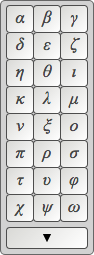 | Greek |
Uppercase Greek letter | 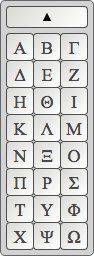 | Greek Click |

Vectors
Notation | Button | Button Group |
|---|---|---|
Vector bracket |
| Vectors |
Unit vector (hat vector) |
| Vectors |
Arrow vector |
| Vectors |
Harpoon vector |
| Vectors |
Bold vector | B | Vectors |
i unit vector | i | Vectors |
j unit vector | j | Vectors |
k unit vector | k | Vectors |


Matrices
Notation | Button | Button Group | Keyboard (if available) |
|---|---|---|---|
Matrix with brackets |
Click | Matrices | |
Matrix with parentheses |
Click | Matrices | |
2-row, 1-column matrix with brackets |
| Matrices | |
2-row, 1-column matrix with parentheses |
| Matrices | |
1-row, 2-column matrix with brackets |
| Matrices | |
1-row, 2-column matrix with parentheses |
| Matrices | |
Insert row above |
| Matrices | |
Insert row below |
| Matrices | ENTER |
Delete row |
| Matrices | |
Insert column to the left |
| Matrices | |
Insert column to the right |
| Matrices | |
Delete column |
| Matrices |


