The Personal Study Plan Overview page displays all the chapters and sections included in the Personal Study Plan®, your most recent Personal Study Plan quiz scores, and links to take Personal Study Plan quizzes or view tutorial materials.
- Prerequisites
- Open the Personal Study Plan Overview Page
You can access the Personal Study Plan Overview page only when a Personal Study Plan is set up for your class.
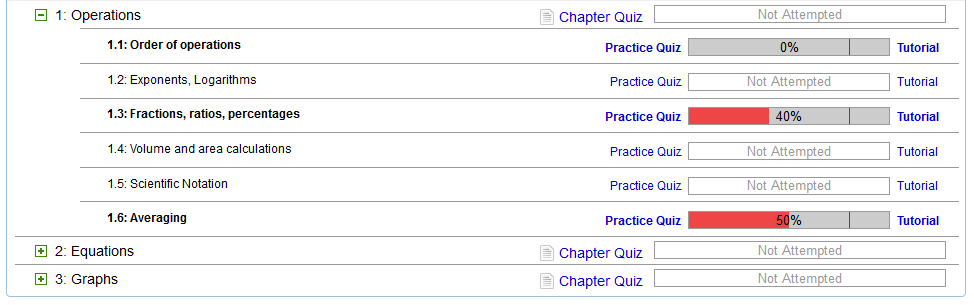
| Item | Description |
|---|---|
| Textbook name | Displays the name of the textbook for the Personal Study
Plan.
If your class uses more than one textbook with an enabled Personal Study Plan, each textbook's Personal Study Plan will open its own Personal Study Plan Overview page. |
 |
Opens the WebAssign Student Help System in a new window and displays information about using Personal Study Plans. |
| About | Displays information about the Personal Study Plan. Your instructor can customize this information. |
| Instructions | Displays instructions for using the Personal Study Plan. Your instructor can customize this information. |
 |
Expands a chapter to show section-level information. |
 |
Collapses a chapter to hide section-level information. |
| Chapter name | Identifies a chapter included in the Personal Study
Plan.
Your instructor might have configured the Personal Study Plan not to include every chapter in the textbook. |
 |
Identifies a section that your instructor has marked as a key concept. What your instructor means when they flag a section as a key concept might vary, but the intent is that you should pay special attention to this section. |
| Section name | Identifies a section included in the Personal Study
Plan.
Your instructor might have configured the Personal Study Plan not to include every section in the chapter. |
| Chapter Quiz | Opens a Personal Study Plan chapter quiz. |
| Practice Quiz | Opens a Personal Study Plan practice quiz. |
| Progress bar with score | Your scores for chapter and practice quizzes are shown in progress bars
that indicate your performance in relation to the mastery levels set by your
instructor.
Note Only your most recent scores are shown. If
you took a chapter quiz more recently than a practice quiz in that chapter,
the practice quiz score reflects your score for questions on the chapter
quiz that relate to that section.
|
| Tutorial | Opens the Personal Study Plan Tutorial page, which lists tutorial materials for the section. |